
Sound like you, not a robot.
Custom reminder messages
Use a ready-made message or write your own for each reminder. NoShow AI fills in each client’s name, the time, your address, and your policies.
No credit card needed. Included in every plan.
How it works
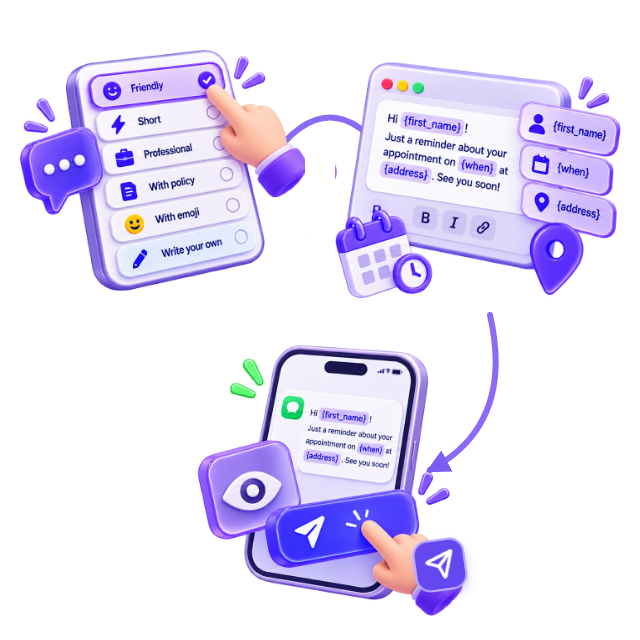
- 1Pick a ready-made message (Friendly, Short, Professional, With policy, or With emoji), or write your own.
- 2Give each reminder its own message, and insert placeholders like {first_name}, {when}, and {address}.
- 3Check the live preview, then send yourself a test text.
Why it helps
- Keep your own voice, and say the right thing a week out and on the day.
- Remind clients of your address, arrival note, or cancellation policy without retyping it.
- Opt-out wording is added for you when it’s missing.
Common questions
Which placeholders can I use?
{first_name}, {business}, {when} (like “tomorrow at 2:00 PM”), {date}, {time}, {business_phone}, and {address}, {instructions} (your arrival note), and {policy} (your cancellation policy), which you fill in once in Settings.
Can each reminder say something different?
Yes. Turn on “Use a different message for each reminder” to write separate texts for the week-ahead, first, and second reminders. Otherwise one message is used for all of them.
How long can a message be?
Up to 320 characters. The preview shows how many texts each reminder uses, so you can keep it to one.
More features
See all featuresStop losing $500+ a month to empty chairs
Start your 14-day free trial today. Connect your calendar and your first reminders go out automatically.